escuchacomprendiendo.ai
A desktop app for Windows, not a plain transcriber: it is designed to give you linked, structured context. Local transcription is tested; the AI analysis step is not yet observed.
That link opens a separate page. If it says more than this one, the limits on this page are the ones that apply.
- Platform
- Windows
- Version
- 1.0.1
- Category
- Productivity
- Page updated
The problem
I record meetings and client explanations. Recording is the easy part: afterwards there are forty minutes of audio nobody will play again. Every client project of mine starts with a meeting, and without a tool that step is manual and depends on the memory of whoever was in the room.
How it works
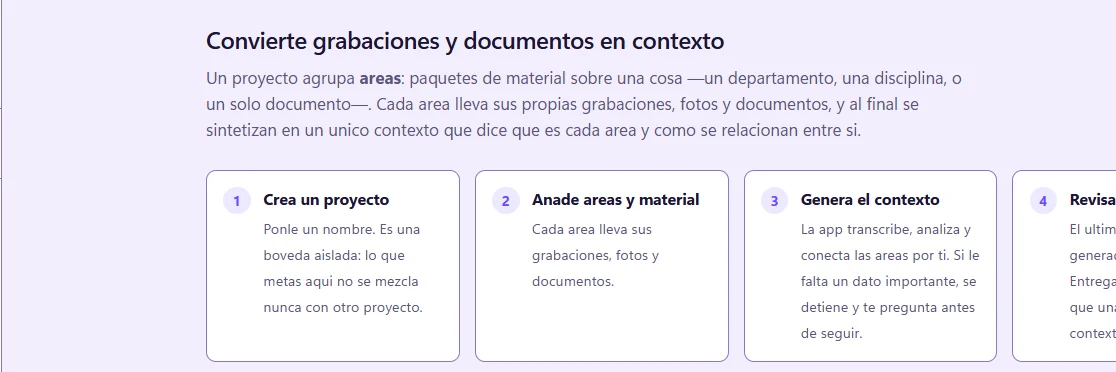
Create a project
A project is an isolated vault: what you put in one never mixes with another.
Add areas and material
Drop in audio (.m4a, .mp3), documents and photos. Each area holds its own recordings, photos and documents.
Choose a transcription engine
faster-whisper runs on your computer, with no connection and no keys. Cloud engines are optional.
Answer only what matters
If an important piece is missing, the app stops and asks before going on. It only asks what changes the result.
Export for Claude
You get a folder ready to load into Claude, or a .zip.
What it does
Cuts at pauses, not by the clock
Audio is normalized and silences are detected, so chunks end where the speaker paused. Tested on 92 seconds of real voice: 26 pauses found (v1.0.0, 2026-08-12).
Local transcription
On a 92-second real-voice sample the whole run, intake to Spanish transcript, took 37 seconds with local faster-whisper, no keys, no connection (v1.0.0, 2026-08-12). I did not record the machine.
Designed to cite every claim
By design, each concept, decision and task cites the fragment and the second of audio it came from, and unknowns are listed. This relies on the AI analysis step, not yet observed end to end.
Designed to read photos and PDFs
Built to read handwriting, arrows and crossed-out text from photos and PDFs and to say what it cannot read. Also part of the AI analysis step.
Designed to record contradictions
When the whiteboard says one thing and the meeting another, the design records a contradiction instead of picking a version.
One isolated vault per project
Material from one project never mixes with another.
Automated tests
160 automated tests passed on v1.0.0 (2026-08-12), including integration against a real ffmpeg.
Screenshots
Who it is for
- Business owners and small content teams who record meetings, calls or voice notes and need something usable afterwards.
- Developers and analysts who record requirements meetings and want to hand the result to Claude.
- Not for you if all you need is a plain text transcript: a simple transcriber is enough.
Requirements
- Windows, as an installer or a portable build. It is the only platform today.
- An access code for the download page, which I give out personally.
- Recordings as .m4a or .mp3, plus documents and photos if you have them.
- Optional: internet and credentials for cloud transcription engines and for the AI analysis step.
Honest limits
- The AI analysis step (it uses Anthropic's models) has not been run end to end. Schemas and error handling cover it, but I have not seen real responses yet. Status as of 2026-08-12.
- My tests and measurements are from v1.0.0 (2026-08-12). The public version is 1.0.1 and I have no separate test record for it.
- I have not published a real example output yet, so this page does not show one.
- Windows only. There is no Mac or mobile version, and the source code is private.
- The download page asks for an access code that I give out personally. The installers themselves are hosted in a public releases repository.
- Local transcription works offline. Cloud transcription engines and the AI analysis step need an internet connection and credentials.
- Speech to text can still get words wrong. In my tests Whisper slipped a stray phrase (“Suscribete!”) over silence; I fixed that case. For anything critical, check the audio.
Questions
Is this a transcriber?
No. A transcriber hands you the same problem in another format: long text nobody reads. This app is designed to give you structured, linked context, with the source of each claim and a list of what is not known.
Does my audio leave my computer?
Not with the local engine: faster-whisper needs no connection. With a cloud transcription engine the audio goes to that service, and the AI analysis step also needs a connection. If your recordings are confidential, ask me first.
How do I get it?
Message me on WhatsApp and I will give you an access code. You enter it on the download page and pick the installer or the portable build, both for Windows. I have not published a price. The download page describes the product more broadly and without these limits; the limits on this page are the ones that apply.
What can I put in?
Audio as .m4a or .mp3, plus documents and photos: handwritten notes, whiteboards, PDFs. My real-voice test was in Spanish; I have not documented other languages.
What do I end up with?
A folder ready to load into Claude, or a .zip. It is designed to hold the structured context, the citations, the contradictions it found and the list of what is not known.
Want to try it?
That link opens a separate page. If it says more than this one, the limits on this page are the ones that apply.